In this post, I'll look at an example stateful function component that is tested with react-testing-library. I'll also write the same component into its class component equivalent and show how the class component can be tested with enzyme.
Checklist Example
Here's a checklist component that allows a user to check off items and display a message after all the items have been checked.
Note: All these examples are written in TypeScript.
1export const Checklist = ({ items }: ChecklistProps) => {2 const [checklistItems, setChecklistItems] = useState(items);34 const handleClick = (itemIndex: number) => {5 const toggledItem = { ...checklistItems[itemIndex] };6 toggledItem.completed = !toggledItem.completed;7 setChecklistItems([8 ...checklistItems.slice(0, itemIndex),9 toggledItem,10 ...checklistItems.slice(itemIndex + 1)11 ]);12 };1314 // Determine if all tasks are completed15 const allTasksCompleted = checklistItems.every(({ completed }) => completed);1617 return (18 <div>19 <form>20 {checklistItems.map((item, index) => (21 <React.Fragment key={item.description}>22 <input23 onChange={() => handleClick(index)}24 type="checkbox"25 className="checkbox"26 checked={item.completed ? true : false}27 id={item.description}28 />29 <label htmlFor={item.description}>{item.description}</label>30 </React.Fragment>31 ))}32 </form>33 <TasksCompletedMessage34 className="xs-text-4 text-green xs-mt2"35 visible={allTasksCompleted}36 >37 All tasks completed{" "}38 <span role="img" aria-label="checkmark">39 ✅40 </span>41 </TasksCompletedMessage>42 </div>43 );44};
Here's what the component would look like when used:
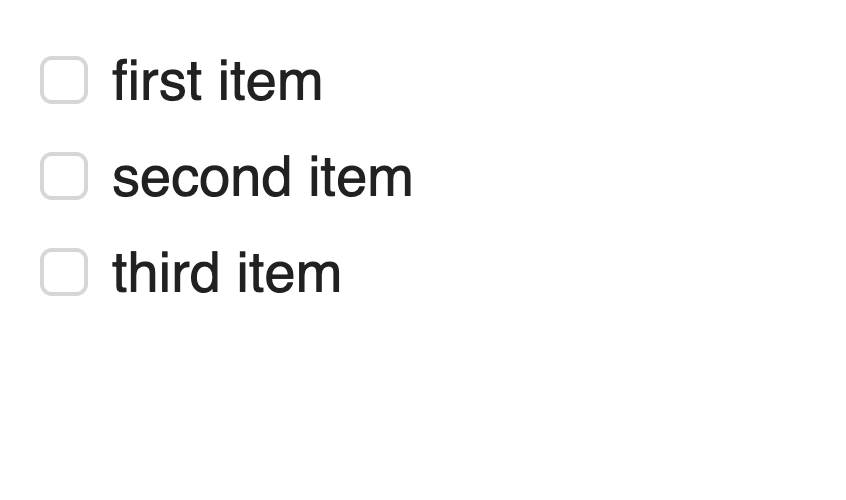
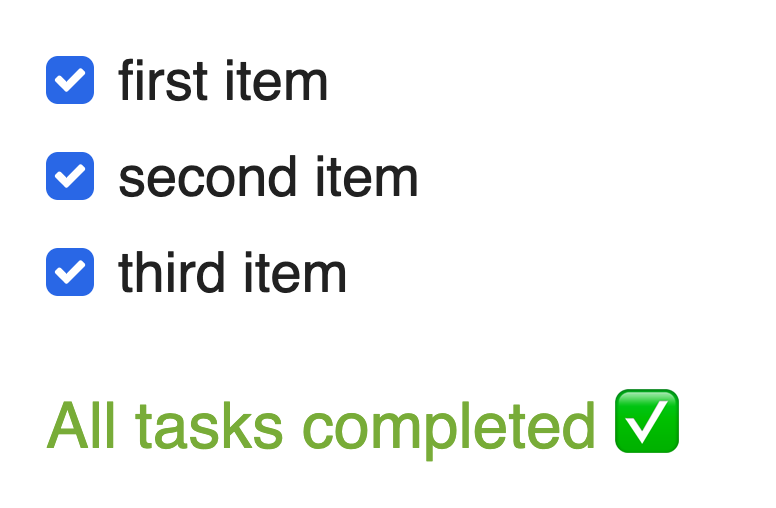
Now when I'm thinking of testing this component, I want to make sure that a user is able to properly select a checkbox and also display the completed message when all the items have been checked. Here's how these tests would look like when written with react-testing-library:
1afterEach(cleanup);23const mockItems = [4 {5 description: "first item",6 completed: false7 },8 {9 description: "second item",10 completed: false11 },12 {13 description: "third item",14 completed: false15 }16];1718describe("Checklist", () => {19 it("should check two out the three checklist items", () => {20 const { getByText, getByLabelText } = render(21 <Checklist items={mockItems} />22 );2324 fireEvent.click(getByText("first item"));25 fireEvent.click(getByText("second item"));2627 expect(getByLabelText("first item").checked).toBe(true);28 expect(getByLabelText("second item").checked).toBe(true);29 expect(getByLabelText("third item").checked).toBe(false);30 expect(getByText("All tasks completed")).not.toBeVisible();31 });3233 it("should display a message when all items are completed", () => {34 const { getByText, getByLabelText } = render(35 <Checklist items={mockItems} />36 );3738 fireEvent.click(getByText("first item"));39 fireEvent.click(getByText("second item"));40 fireEvent.click(getByText("third item"));4142 expect(getByLabelText("first item").checked).toBe(true);43 expect(getByLabelText("second item").checked).toBe(true);44 expect(getByLabelText("third item").checked).toBe(true);45 expect(getByText("All tasks completed")).toBeVisible();46 });47});
Another important thing to notice in these tests is that we aren't looking at the value for the internal component state, nor are we testing any of the functions being used within the component itself. Basically what this means is that we don't care about testing the implementation details of our component, but we are more interested in testing how the component will actually be used by a user. Actually, it's extremely difficult to test implementation details of a function component since it's not possible to access the component state, nor can we access any of the functions/methods that are defined and used inside of the component. However, as a fun exercise, let's look at our checklist component written in as a class component:
1export class Checklist extends React.Component<ChecklistProps, ChecklistState> {2 state = {3 checklistItems: this.props.items4 };56 handleChange = (itemIndex: number) => {7 const toggledItem = { ...this.state.checklistItems[itemIndex] };8 toggledItem.completed = !toggledItem.completed;9 this.setState({10 checklistItems: [11 ...this.state.checklistItems.slice(0, itemIndex),12 toggledItem,13 ...this.state.checklistItems.slice(itemIndex + 1)14 ]15 });16 };1718 render() {19 // Determine if all tasks are completed20 const allTasksCompleted = this.state.checklistItems.every(21 ({ completed }) => completed22 );23 return (24 <div>25 <form>26 {this.state.checklistItems.map((item, index) => (27 <React.Fragment key={item.description}>28 <input29 onChange={() => this.handleChange(index)}30 type="checkbox"31 className="checkbox"32 checked={item.completed ? true : false}33 id={item.description}34 />35 <label htmlFor={item.description}>{item.description}</label>36 </React.Fragment>37 ))}38 </form>39 <TasksCompletedMessage40 className="xs-text-4 text-green xs-mt2"41 visible={allTasksCompleted}42 >43 All tasks completed{" "}44 <span role="img" aria-label="checkmark">45 ✅46 </span>47 </TasksCompletedMessage>48 </div>49 );50 }51}
Now, let's use enzyme to test our checklist class component. However, this time we will be testing the implementation details of our component.
1const mockItems = [2 {3 description: "first item",4 completed: false5 },6 {7 description: "second item",8 completed: false9 },10 {11 description: "third item",12 completed: false13 }14];1516describe("Checklist Class Component", () => {17 it("should render all 3 list items", () => {18 const wrapper = mount(<Checklist items={mockItems} />);1920 expect(wrapper.find("label").length).toBe(3);21 });2223 describe("handleChange", () => {24 it("should check two out the three checklist items", () => {25 const wrapper = mount(<Checklist items={mockItems} />);26 const instance = wrapper.instance();2728 instance.handleChange(0);29 instance.handleChange(1);3031 expect(wrapper.state("checklistItems")).toEqual([32 {33 description: "first item",34 completed: true35 },36 {37 description: "second item",38 completed: true39 },40 {41 description: "third item",42 completed: false43 }44 ]);45 });4647 it("should display a message when all items are completed", () => {48 const wrapper = mount(<Checklist items={mockItems} />);49 const instance = wrapper.instance();5051 instance.handleChange(0);52 instance.handleChange(1);53 instance.handleChange(2);54 wrapper.update();5556 expect(57 wrapper58 .find(".text-green")59 .first()60 .props().visible61 ).toBe(true);62 });63 });64});
should check two out the three checklist items, the handleChange method is triggered twice (which should happen when a user clicks two checklist items) and then the value of the state is checked to make sure it has updated appropriately. The problem with this test is that we aren't testing how this component is actually being used. The user doesn't care about the value of a component's internal state or if a function has been called. All a user cares about (in this case) is that they are able to click on two checklist items and that both those checklist items appear as checked to them.
Enzyme's API doesn't allow for an element to be find by it's text, it only allows for elements to be selected based on a CSS selector, React component constructor, React component display name, or based on a component's props (see here for details on Enzyme selectors). Because Enzyme's API basically pushes you to test implementation details for a component, I prefer to stay away from Enzyme and instead use react-testing-library.
Refactoring Class Components to Function Components
Another advantage of using react-testing-library and not testing for implementation details is that you can easily refactor your class component to a function component without having the also refactor your tests. Think about it, if you're targeting class methods in your tests, those methods will no longer be available when it's being implemented within a function component.
Demo Repository
I've setup a demo repository, that contains the above example with the checklist and I've also created another example for a component named SelectTwo, which is a list of items that only allows for 2 items to be selected at once.
Other Ressources
Here are some great ressources that you should check out if you're interested in learning more about react-testing-library.